> ## Documentation Index
> Fetch the complete documentation index at: https://help.zctc.cc/llms.txt
> Use this file to discover all available pages before exploring further.
# 快速开始
> 设置以下工作可以快速使用系统。
# 1. APP下载安装
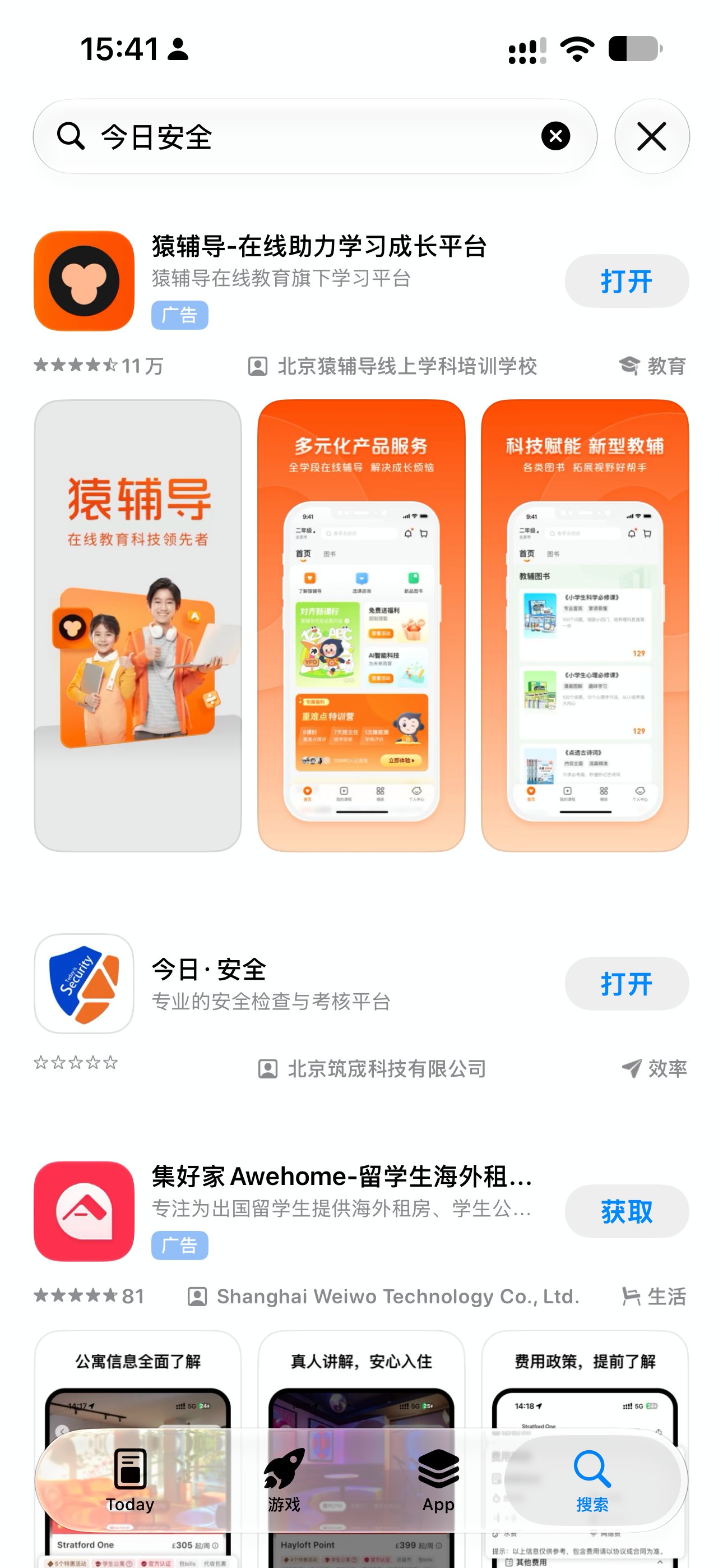
请在各手机应用商店搜索:“今日安全”下载安装APP,目前已上架的手机品牌有:华为、荣耀、小米、vivo、oppo、苹果,其他手机可通过[https://www.jianguoyun.com/p/DeC-cT4QraH3Cxi\_r58GIAA](https://www.jianguoyun.com/p/DeC-cT4QraH3Cxi_r58GIAA)下载最新版
 # 2. 账号注册
## 2.1 个人账号注册
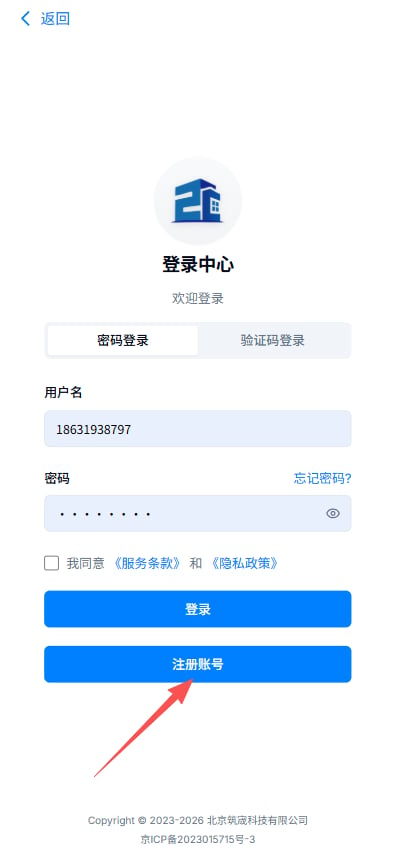
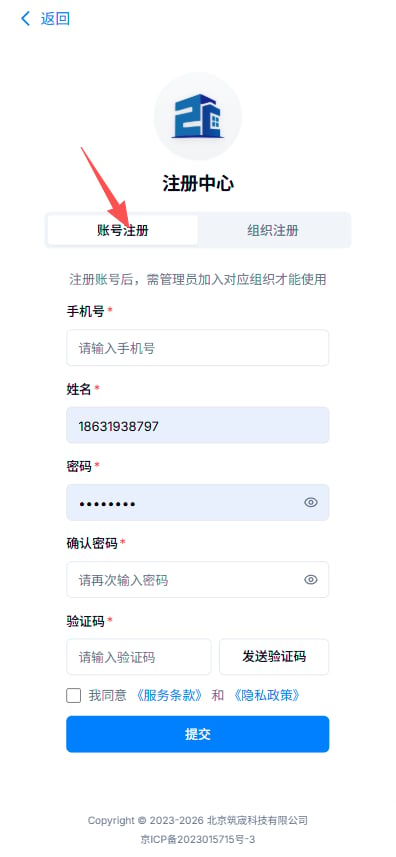
打开安装的“今日·安全”APP,用户协议同意后,自动进入登录页面,按下图操作即可。
# 2. 账号注册
## 2.1 个人账号注册
打开安装的“今日·安全”APP,用户协议同意后,自动进入登录页面,按下图操作即可。
 ## 2.2 组织注册
每个集团公司、子分公司、项目部或协作队伍都需要一个人负责注册一个组织账号。组织名称一般为:XX集团有限公司、XX集团(局)XX公司、XX集团XX公司XX项目,名称尽量简洁。
## 2.2 组织注册
每个集团公司、子分公司、项目部或协作队伍都需要一个人负责注册一个组织账号。组织名称一般为:XX集团有限公司、XX集团(局)XX公司、XX集团XX公司XX项目,名称尽量简洁。
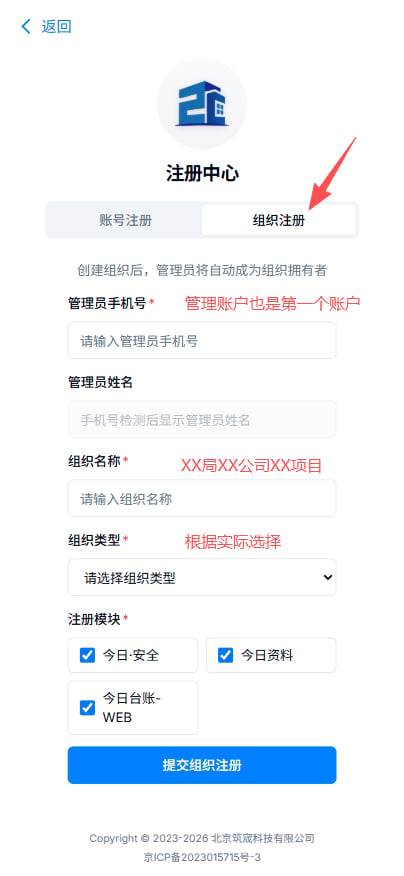 注:一个组织仅需注册一个账号即可,不要反复注册,一般由安全总监安排,注册时需要一个管理员的账号,账号需要先完成个人账号注册。
## 2.3 账号登录
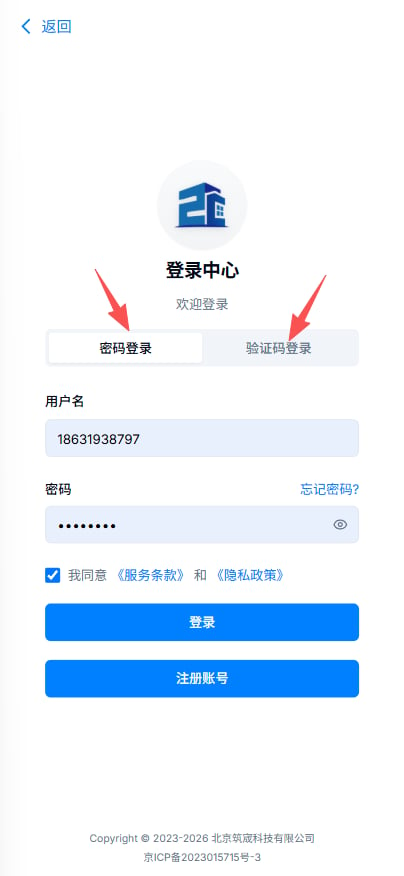
组织注册后,返回上一页管理员账号就可以登录,之后普通账户也是同样的登录步骤。登录可以用密码登录也可以使用验证码登录。
注:一个组织仅需注册一个账号即可,不要反复注册,一般由安全总监安排,注册时需要一个管理员的账号,账号需要先完成个人账号注册。
## 2.3 账号登录
组织注册后,返回上一页管理员账号就可以登录,之后普通账户也是同样的登录步骤。登录可以用密码登录也可以使用验证码登录。
 # 3. 项目设置
## 3.1 项目设置
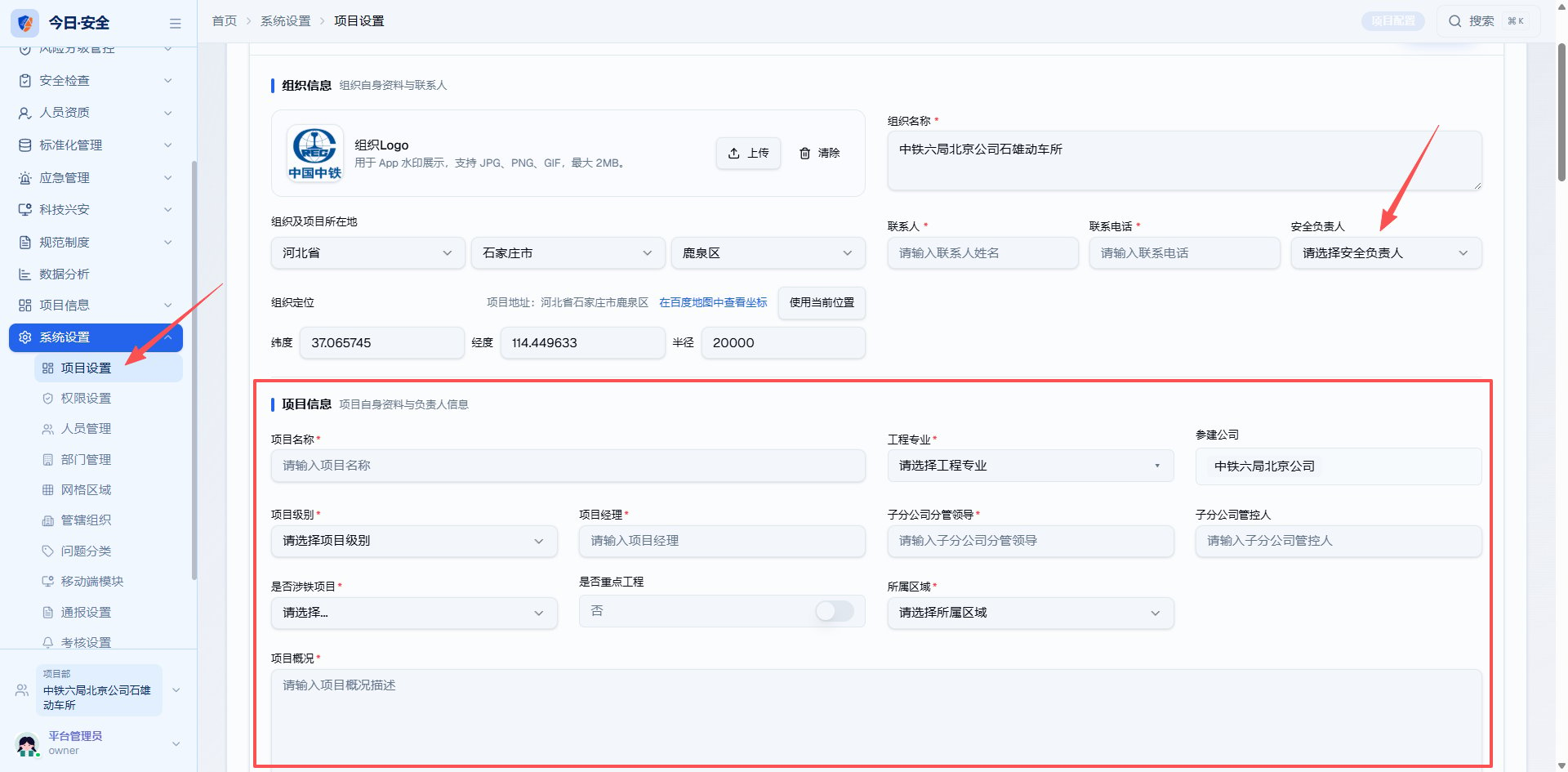
登录:[https://jraq.zctc.cc](https://jraq.zctc.cc) 进入网页端,点击左侧的系统设置,项目设置进行初步的项目信息填写。
# 3. 项目设置
## 3.1 项目设置
登录:[https://jraq.zctc.cc](https://jraq.zctc.cc) 进入网页端,点击左侧的系统设置,项目设置进行初步的项目信息填写。
 Describe how someone begins using your product. What is the first thing they need to do? Are there any prerequisites?
A quickstart should take someone from zero to using your product. They'll get a quick win and a sense of what they can accomplish.
## Prerequisites
Before you begin, you must have:
* Requirement one (for example, Node.js 18+, a free account, an API key)
* Requirement two (for example, a compatible device, a compatible browser, a compatible operating system)
## Get started
Describe how to install your product or sign up.
```bash theme={null}
npm install your-package
```
Describe any setup or configuration needed before first use.
```bash theme={null}
your-cli init
```
Show the first thing a user does to see it working.
```bash theme={null}
your-cli start
```
Give people a way to get help. This could be a link to a support page, a chat with a customer support agent, or a forum for your product.
Example: Need help? Reach out to us at [support@yourcompany.com](mailto:support@yourcompany.com).
This documentation is built and hosted on [Mintlify](https://mintlify.com), a developer documentation platform.
Describe how someone begins using your product. What is the first thing they need to do? Are there any prerequisites?
A quickstart should take someone from zero to using your product. They'll get a quick win and a sense of what they can accomplish.
## Prerequisites
Before you begin, you must have:
* Requirement one (for example, Node.js 18+, a free account, an API key)
* Requirement two (for example, a compatible device, a compatible browser, a compatible operating system)
## Get started
Describe how to install your product or sign up.
```bash theme={null}
npm install your-package
```
Describe any setup or configuration needed before first use.
```bash theme={null}
your-cli init
```
Show the first thing a user does to see it working.
```bash theme={null}
your-cli start
```
Give people a way to get help. This could be a link to a support page, a chat with a customer support agent, or a forum for your product.
Example: Need help? Reach out to us at [support@yourcompany.com](mailto:support@yourcompany.com).
This documentation is built and hosted on [Mintlify](https://mintlify.com), a developer documentation platform.